Quick resend functionality
Sometimes a message that has been previously sent needs to be sent again. The normal way to do that is to recompose a new message by copying the contents of the old one. This leads to a new message with identical contents except for the Date and Message-Id header fields.
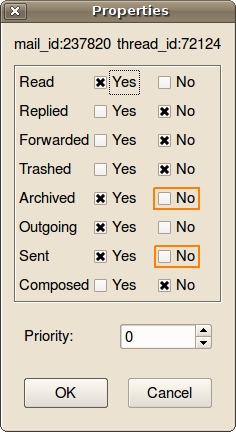
However, there is a quicker way to re-send an outgoing message without the need to create a duplicate of the original: if the Sent and Archived bit of the message status are cleared, manitou-mdx will just pick up again the message for sending as if it was new. To clear these bits, use the Message->Properties command and check No in the boxes drawn with the red border in the screenshot: